How to Listen to Radio Stations Online: A Beginner's Guide
October 01, 2026 · Updated November 02, 2026
Online radio, often called internet radio or web radio, delivers live audio over the internet instead of over the air. If you can open a web page, you can listen to a radio station from another city or another continent. This guide explains how it works and how to get the most out of it.
What you need
You need three things: an internet connection, a device with a modern browser (phone, tablet, laptop or smart TV browser), and the address of a station's live stream. On a directory such as Eiwim the stream is already built into the station page, so you only press play.
How online radio works
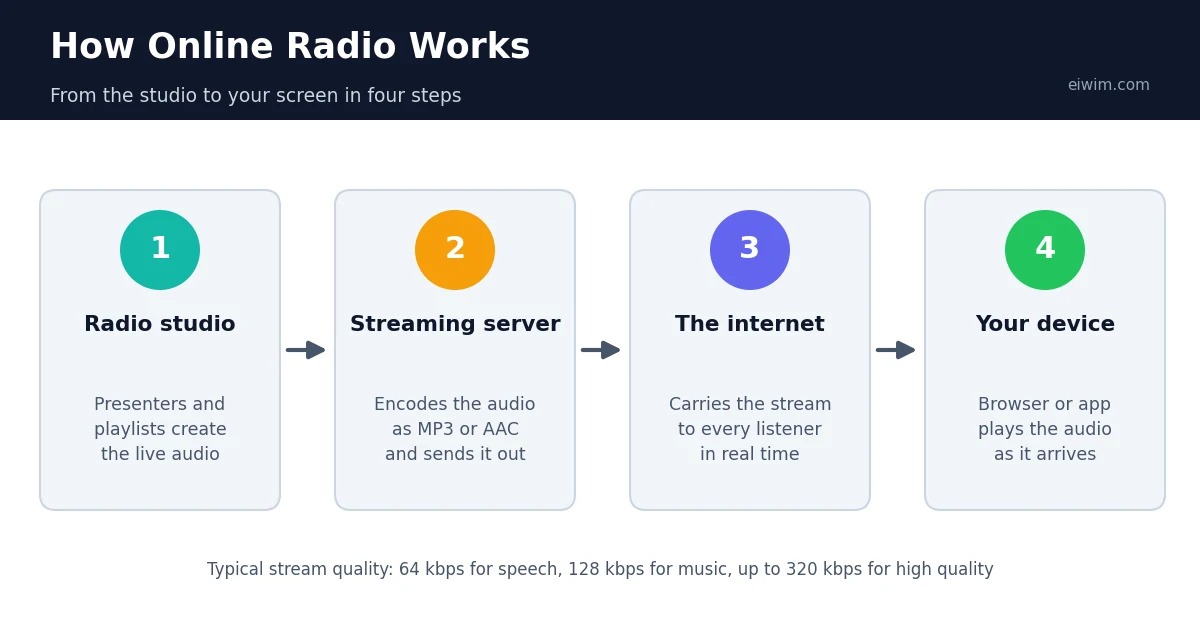
A station sends its audio to a streaming server, which passes it on to listeners over standard web connections. Most streams use the MP3 or AAC audio formats. The quality is described by the bitrate: 64 kbps is acceptable for speech, 128 kbps is a common standard for music, and 192 to 320 kbps is high quality. Higher bitrates sound better but use more data.
How much data does it use?
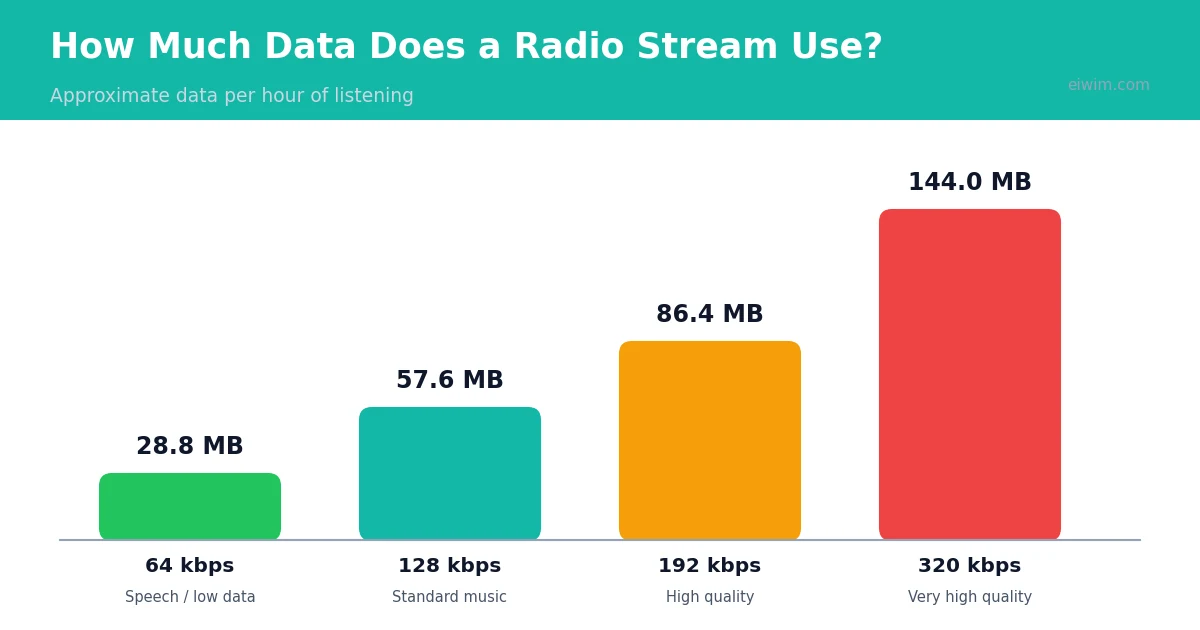
A stream at 128 kbps uses about 57.6 MB per hour, and a 64 kbps stream uses about 28.8 MB per hour. If you listen on mobile data, choose lower-bitrate stations or listen over Wi-Fi when you can.
Finding a station you will enjoy
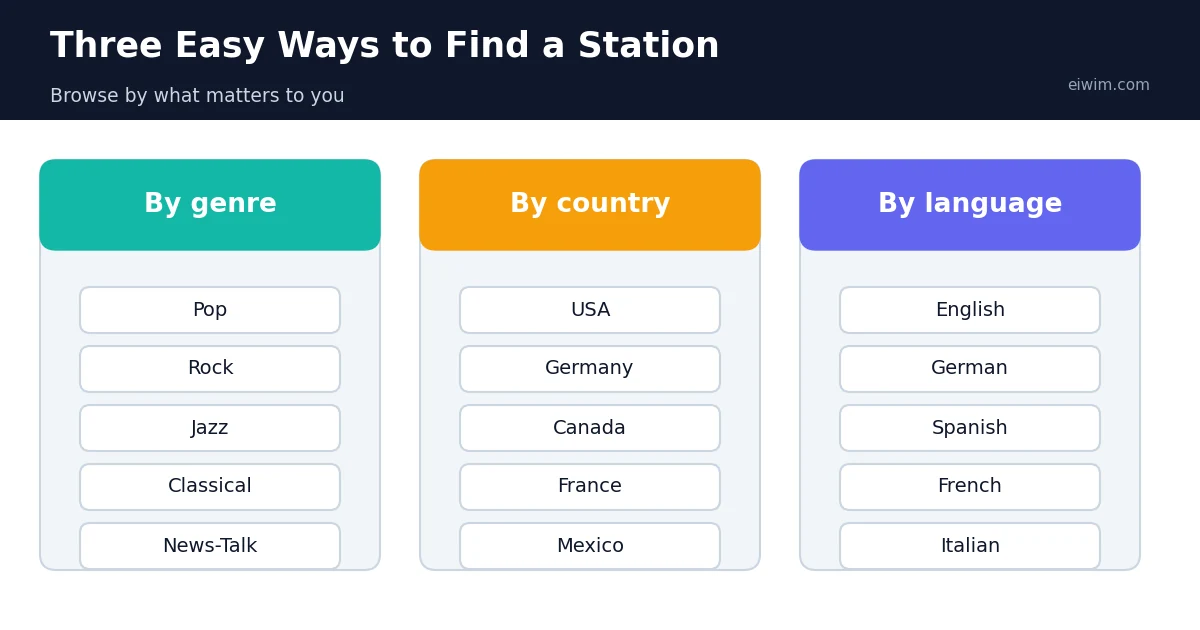
- By genre. If you know what you like, start from a genre such as Pop, Rock, Jazz or Classical. You can see every genre on the genres page.
- By country. To hear local music and news from a place, browse by country, for example USA, Germany or Canada. The full list is on the countries page.
- By language. Listening in a language you are learning is a good way to practise. Try English, German or Spanish stations, or see all options on the languages page.
- News and talk. Spoken-word stations in the News-Talk category are useful if you want headlines and discussion rather than music.
Tips for a smoother experience
- Use a wired or stable Wi-Fi connection for the best sound.
- Close other tabs that play audio or video so the stream has enough bandwidth.
- Save stations you like to your favourites so you can return quickly.
- If a stream stops, refresh the page; many problems are temporary.
Is online radio free?
Listening to a station's public stream is free. Stations pay for their own streaming and licensing, which is why many include advertising or sponsor messages. Always treat a station's website as the official source for its programmes and contact details.
Ready to try it? Open the genres page, pick a style, and press play on the first station that catches your eye.
Choosing between a browser and an app
You can listen to online radio in two main ways. A web browser needs nothing extra: you open a station page and press play. It works on phones, tablets and computers, and you never need to update anything. An app, on the other hand, can keep the audio running in the background, show controls on the lock screen and remember your favourite stations. If you only listen occasionally, the browser is enough. If radio is part of your daily routine, an app from an official store may be more convenient. Whichever you choose, the stations themselves are the same, because both methods simply connect to the station's stream.
Understanding a station page
A good station page tells you quite a lot before you press play. The name and logo identify the station. The country and language tell you where it is from and what you will hear. The genre tags, such as Pop, Jazz or News-Talk, describe the music or format. Some pages also show the frequency of the station on the dial, a short description and a list of similar stations. If you like what you hear, save it to your favourites so you can find it again. If something is wrong, for example a stream that stays silent, use the report option so the listing can be checked.
Getting good sound on a small budget
You do not need expensive equipment to enjoy radio. Most phones and laptops have adequate speakers for talk stations, and any basic pair of headphones makes music sound fuller. If you want to improve the sound cheaply, start with the position of your speakers, since placing them at ear height and away from walls often helps more than buying new equipment. A stable connection matters as much as the speakers, so try to be near your router. Our guide to improving audio quality when streaming radio has more ideas.
Common beginner mistakes
- Judging a station too quickly. Give a station at least ten minutes. Playlists vary through the day, and one song is rarely representative.
- Ignoring the language filter. If you want music you can sing along to, check the language before you start.
- Listening on mobile data without thinking. A music stream at 128 kbps uses about 57.6 MB per hour, so switch to Wi-Fi when you can.
- Installing unnecessary players. Radio plays in a normal browser, so be suspicious of any site that asks you to download something first. See our post on staying safe while streaming radio.
- Giving up after one failure. Streams occasionally drop out. Refresh the page or try another station before assuming something is broken.
With these basics, you are ready to explore thousands of stations, from Rock and Classical to local radio in other countries.
Build your own radio routine
Many regular listeners settle into a routine that fits their day. A news station might accompany breakfast, a calm instrumental or Classical station helps with morning work, and an upbeat Pop or Rock station fills the commute or housework. In the evening, a Jazz or Chillout station suits winding down. Keeping three or four favourites ready means you never have to search when you want to listen, and you can still explore something new at the weekend. If you want ideas for that, read our guide to radio genres for studying and focus.